
VoltQueue for Slack
Join the EV charging queue
without leaving Slack.
One command to join the line. A direct message when your stall is ready. VoltQueue coordinates your workplace EV chargers — Slack makes it effortless.
Requires a VoltQueue workspace. Sign up free if you don't have one yet.
One command
Type /charge to join the queue.
Connect your Slack workspace to VoltQueue and your whole team can join the EV charging queue without opening a browser. VoltQueue handles the coordination — who's next, who needs to move, when a stall opens up.
Join in seconds
Type /charge in any channel or DM. VoltQueue adds you to the queue and confirms your position instantly.
Get notified when it's your turn
VoltQueue sends you a direct message the moment a stall opens up for you. No checking, no waiting around.
Check your position or leave
Use /charge again to see where you are in the line or drop out entirely. No forms, no email.
Slack · #ev-charging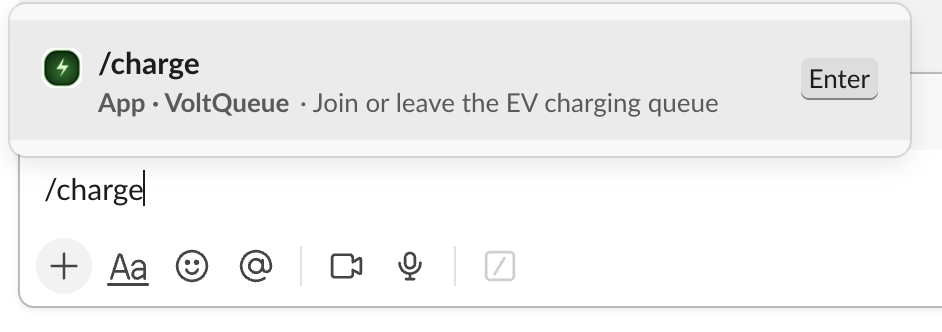
How it works
Set up in minutes.
01
Create a VoltQueue workspace
Sign up at voltqueue.com, create your organization, and add your EV charging stalls. Free 14-day trial, no credit card required.
Sign up free02
Connect Slack
In your VoltQueue admin settings, click "Connect Slack" — or click the Add to Slack button on this page. Authorize the app in one click.
03
Your team types /charge
That's it. Anyone in your Slack workspace can now join the EV charging queue, check their position, and get notified when it's their turn.
More than a Slack command.
VoltQueue is a full workplace EV charging coordination platform. Slack is one way to use it — but everything works from the web too.
Real-time stall status
See every charger — available, charging, overdue, or incoming — from any browser, updated live.
QR code check-in
Scan the QR code on any stall to check in or join the queue. No app download required.
Admin analytics
Track session length, peak hours, utilization rate, and queue wait time across all your sites.
Visual lot layout
Build a map of your parking lot and see live stall status exactly where the chargers are.
Violation management
Report occupied stalls, track overstays, and force-claim with photo evidence when needed.
Multi-site support
Manage multiple locations from one account with site-specific queues and analytics.
What VoltQueue can access in Slack
VoltQueue requests only the permissions needed to send direct messages to users and look up user information to link Slack accounts with VoltQueue accounts.
chat:writeSend messagesUsed to send direct messages to users when it's their turn for a charger, when they're added to or removed from the queue, or when their session goes overdue.
users:readView people in the workspaceUsed to look up user email addresses so VoltQueue can match Slack users to their VoltQueue accounts. We do not store Slack profile data beyond what's needed for account linking.
VoltQueue does not read channel messages, post to public channels, or access any data beyond what is described above. Read our full Privacy Policy for details.
Ready to add VoltQueue to Slack?
You'll need a VoltQueue workspace first. It takes about two minutes to set up.
14-day free trial · no credit card required